
Secy for Slack
Your Slack, read for you.
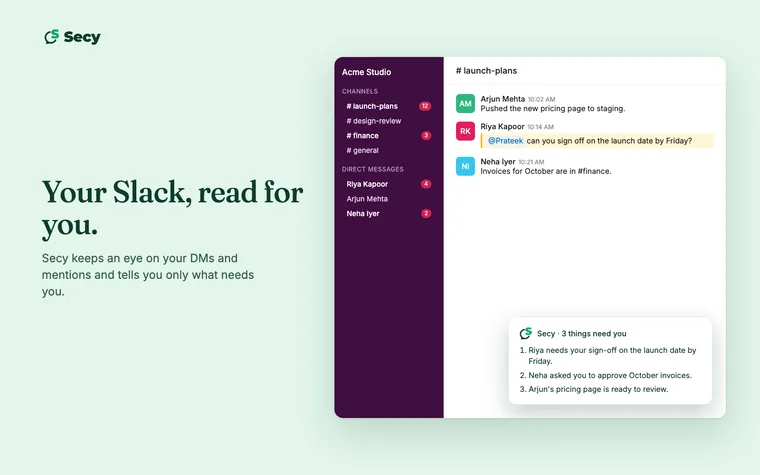
Secy keeps an eye on your Slack and tells you only what needs you. It only reads, and never posts in your Slack.
What Secy does in Slack
- Tells you what needs you. Secy reads your DMs and mentions and gives you a short note in your Secy chat with only the things that need you, not every unread.
- Answers questions about past conversations. Ask “what did Riya say about the launch date?” and Secy finds it in the Slack you can see.
How to connect
- Sign in at my.heysecy.ai, your Secy account page.
- Choose Connect Slack.
- Slack shows what Secy is asking for. Approve it, and you’re back on your account page with Slack connected.
You can disconnect anytime from the same page.
Secy is in early access. No account yet? Ask for early access.
Privacy
- Secy acts as you, nothing more. It asks Slack for permissions on your own account only. No bot is added to your workspace, and Secy sees only what you can already see.
- Secy only reads. It posts nothing as you: no messages, no files, no reactions. Every permission it asks for is read-only.
- Disconnecting deletes what Secy pulled in. When you disconnect, the Slack messages Secy brought in are deleted.
Our Privacy Policy has the full details.
What Secy asks Slack for
Eight permissions, all read-only. None of them can post.
- Read your direct messagesTo find what needs you.
- Read your group DMsTo find what needs you.
- Read public channels you’re inOnly the ones you’ve joined.
- Read private channels you’re inOnly the ones you’ve joined.
- Search your SlackTo answer questions about past conversations.
- See member namesSo a note says who wrote.
- See public channel namesSo a note says where.
- See private channel namesSo a note says where, for private channels you’re in.
Questions? See Support or write to hello@heysecy.ai.